CLI Reference
All commands are available as yazses <command> once installed globally (uv tool install / pipx install), or as uv run yazses <command> from the repo.
Looking for the exhaustive, option-by-option list? See the auto-generated Command Index — every command, argument and flag, generated straight from the app. This page is the hand-written companion: it groups the commands the way
yazses --helpdoes, and gives each a synopsis, its key options, and at least one worked example. For the full config surface see the Configuration Reference; for the full feature catalogue see the Feature Reference.
Getting help. Every command and subcommand accepts both -h and --help; each shows its options plus a worked Examples block. yazses --help lists all commands grouped into six panels — Updates & maintenance, Daemon, Setup & calibration, Dictation & correction, Remote, and Learning & tuning — and bare yazses shows the same help. yazses --version / -V prints the version.
Tab completion. Run yazses --install-completion once to enable <Tab> completion of commands and options in your shell (yazses --show-completion prints the script to inspect or customise).
The sections below follow the same six panels.
Updates & maintenance
| Command | Description |
|---|---|
yazses about | Print a branded banner with the author, version, project links, and where to report a bug or request a feature. |
yazses update | Check for a newer version and offer to install it. |
yazses about
Shows a branded banner: author, installed version, project links, and where to report issues or request features (issues: https://github.com/MSKazemi/yazses/issues; author: Mohsen Seyedkazemi Ardebili mohsen.seyedkazemi@gmail.com). Read-only.
yazses update
Detects how YazSes was installed and checks the matching source — the tracked snap channel for snap installs, PyPI for pip / pipx / uv-tool — then upgrades only when the available version is strictly newer (never a downgrade).
Options: --check (report only, don't install) · --yes / -y (install without prompting).
yazses update           # check for a newer version and offer to install it
yazses update --check   # only report what's available (don't install)
yazses update --yes     # install without asking
After a successful update, restart the daemon to load it: systemctl --user restart yazses (or yazses stop && yazses start).
Daemon
| Command | Description |
|---|---|
yazses start | Start the daemon; restarts cleanly if one is already running (never a duplicate). |
yazses restart | Stop all daemons (including stray/detached ones) and start exactly one. |
yazses stop | Stop the running daemon. |
yazses status | Show state, hotkey, model, injection backend, and uptime over IPC. |
yazses tray | Show the top-bar tray icon + click-menu (pick/pin mic, re-calibrate, start/stop). |
yazses features | See capabilities and turn them on/off — no config-file editing. |
yazses-daemon | Run the daemon in the foreground (logs to console) — useful for debugging. |
yazses start
Loads the speech model once (first run 10–30 s) and listens for the hotkey. Routes through systemd when a yazses.service user unit is installed (so it's supervised and self-heals), else spawns detached. Verifies the daemon actually came up: reports when it's ready, notes when it's still loading, or reports a startup crash with the reason and exits non-zero. If one is already running it restarts it (killing any stray duplicates) rather than spawning a second — so you never double-type. Warns if a runtime prerequisite is missing (run yazses setup) or if an input-group re-login is still pending.
yazses restart
Stop all daemons (including stray/detached ones) and start exactly one, then verify readiness (same as start). Use this if dictation is being typed twice (a sign of duplicate daemons). Same prerequisite warnings as start.
yazses stop
Stop the running daemon (SIGTERM). Dictation stays off until you yazses start again; to pick up a config or version change instead, use yazses restart. Exits non-zero (with "nothing to stop") when none is running.
yazses status
Show state, hotkey, model, injection backend, and uptime over IPC. When not running, points you at yazses start (and yazses quickstart for new users); while the model is still loading it says so rather than looking broken. Pass --json for machine-readable JSON output for status bars or scripts.
yazses status         # is it running? show state, model, and hotkey
yazses status --json  # output state, pid, model, and ready as JSON
yazses tray
Show a microphone icon in the top bar with a click-menu — a no-terminal way to manage the mic and daemon. The menu lets you pick/pin the input microphone from a live device list, re-calibrate the mic level, and restart/stop the daemon; the icon reflects daemon state and turns orange when it detects a run of silent clips.
yazses tray               # show it now (blocks; Ctrl-C to stop)
yazses tray --background   # launch it detached and return
Mic changes from the menu take effect live (no restart). The daemon also launches the tray automatically when a desktop is present — yazses tray just shows it right now. "Quit tray" closes the icon but leaves dictation running (use "Stop daemon" to stop it). Needs a system tray host — on GNOME that's the AppIndicator extension (standard on Ubuntu); disable auto-launch with yazses features disable tray.
yazses features
The friendly switchboard for turning capabilities on and off — no config-file editing. Bare yazses features lists every capability grouped by category, showing whether each is on/off, its toggle name, and an advice tier.
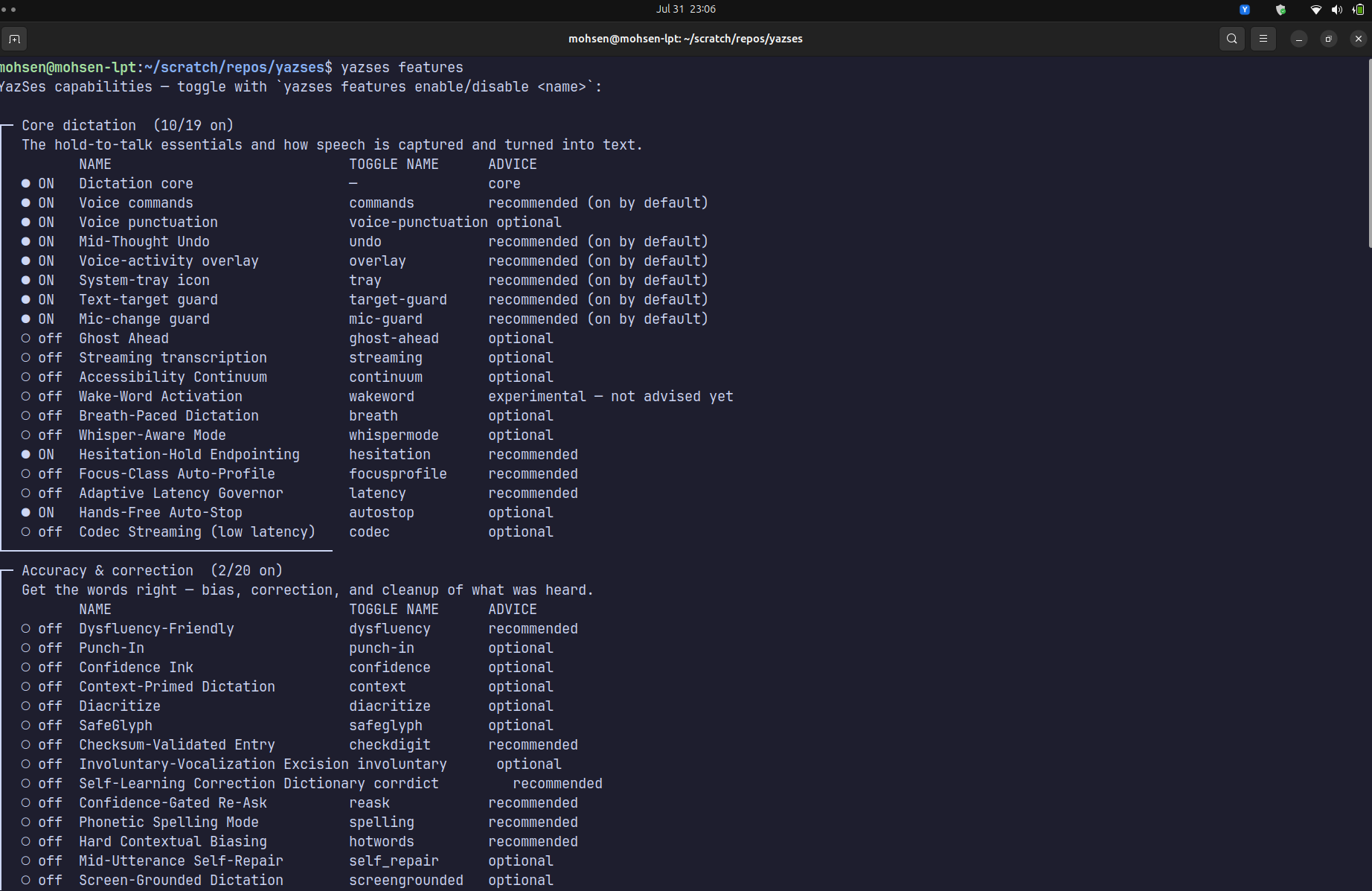
Options (on the list view):
| Option | Effect |
|---|---|
--on | Show only capabilities that are currently ON. |
--tier <tier> | Filter by advice tier: core, on, rec, opt, exp. |
--category / -c <name> | Filter by category name (partial, case-insensitive), e.g. access. |
Subcommands:
| Command | Description |
|---|---|
yazses features info | Describe every capability — name, what it does, a usage example (the full catalogue; pipe to less). |
yazses features info <name> | Describe one capability — what it does, a usage example, and how to toggle it. |
yazses features enable <name> | Turn a capability on (writes your config), then yazses restart to apply. |
yazses features disable <name> | Turn a capability off, then yazses restart. |
yazses features                          # every capability, grouped, + advice
yazses features --on                     # show only what's currently enabled
yazses features --tier rec               # show only the recommended tier
yazses features --category Multilingual  # show one category
yazses features info                     # describe ALL capabilities + usage examples
yazses features info reflow              # describe one + show a usage example
yazses features enable read-back         # turn one on  (use the TOGGLE NAME)
yazses features disable cocktail         # turn one off
yazses restart                           # apply
Each row shows an advice tier:
Tier (--tier) | Meaning |
|---|---|
core | Always on (e.g. Dictation core) — can't be toggled. |
on | recommended (on by default) — shipped on; keep it (Voice commands, Mid-Thought Undo, overlay). |
rec | recommended — safe and useful, worth enabling (e.g. Dysfluency-Friendly if you stutter). |
opt | optional — enable only if you want that capability (Punch-In, Prosody Ink, Read-Back, …). |
exp | experimental — not advised yet — known rough edges (Cocktail Filter, Glance-Type). Refused unless you pass --force. |
Experimental features are guarded: yazses features enable cocktail prints why it's not advised and exits; add --force to override.
The complete catalogue lives in the Feature Reference.
yazses-daemon
Run the daemon in the foreground, logging to the console — useful for debugging. This is the entry point yazses start supervises in the background.
Setup & calibration
| Command | Description |
|---|---|
yazses quickstart | New here? Start here. A 3-step, machine-tailored getting-started guide (read-only). |
yazses doctor | Health check: what's OK / missing, ending in a one-line verdict. |
yazses mic-level | Measure your mic speech level and recommend (or set) the VAD threshold. |
yazses logs | Show the daemon's diagnostic log (metadata only — no dictated text). |
yazses setup | Provision all Linux runtime requirements so dictation works out of the box. |
yazses enroll | Accessibility enrollment wizard: calibrate VAD thresholds to your voice. |
yazses enroll-voice | Record an encrypted speaker voiceprint (for Cocktail Filter + Voiceprint Mind). |
yazses model | Manage the SLM intent-routing models (list / download). |
yazses vocab | Manage your personal dictionary (words STT mis-hears). |
yazses acronyms | Manage a persistent acronym glossary and expand acronyms in text. |
yazses wordgoal | Track words written against a writing goal, across invocations. |
yazses cliphistory | A persistent clipboard history you can recall by voice-style reference. |
yazses outline | Build a nested outline incrementally and render it to Markdown/OPML. |
yazses srs | Capture facts as flashcards and schedule reviews (SM-2). |
yazses hotkey | Show or change the key you hold to talk. |
yazses audio | See and pin the input microphone (fixes a mic that silently switches). |
yazses gaze | Aim dictation with your gaze — type into whichever pane you look at. |
yazses quickstart
Looks at what's already set up (prerequisites, whether the daemon is running, the speech model, your hotkey) and prints exactly what to do next (setup → start → hold the key), plus handy follow-ups. Safe to run anytime — it changes nothing.
yazses doctor
Reports the installed version and daemon status (PID/state/model), then verifies platform, keyboard-capture and microphone permissions, which input device the hotkey binds to (flags a virtual injector device that would make the hotkey dead), the session type (X11/Wayland) and its injection tools, injection readiness + ydotoold status, the STT model and model cache, the config dir, the active config + hotkey summary, and any configured extras (EMG port, prosody). Each line is OK / WARN / FAIL / SKIP, and it ends with a one-line verdict: ✓ everything's good, ▲ only optional warnings remain, or ✗ N problems to fix — each with the concrete next command.
Options: --mic (also record a short ambient clip and warn if room level meets/exceeds accessibility.vad_threshold).
yazses doctor          # run this first if dictation isn't working
yazses doctor --mic    # also sample the mic and compare it to the VAD gate
yazses mic-level
Records a few seconds while you speak, reports your average mic level vs the current vad_threshold, and recommends a threshold. Use it when dictation logs Silent audio -- discarding.
Options: --set (write the recommended threshold to config.toml in place, comments preserved) · --seconds / -s N (record for N seconds instead of 4).
yazses mic-level          # measure and recommend a threshold
yazses mic-level --set    # measure and write it to config.toml
yazses mic-level -s 6     # record for 6 seconds instead of 4
yazses logs
Print the diagnostic log — metadata only, never your dictated text.
Options: --lines / -n N (show the last N lines; default 40) · --path (print the log file path and exit — ~/.local/state/yazses/log/daemon.log).
yazses logs          # last 40 log lines
yazses logs -n 100   # last 100 lines
yazses logs --path   # just print the log file path
yazses setup
Linux provisioning, one command. Installs the audio + injection system packages (libportaudio2, xdotool, ydotool, wtype, xclip, wl-clipboard), adds you to the input group (needed for the hotkey and for ydotool's /dev/uinput access), and on Wayland sets up + enables the ydotoold user service (required for injection on GNOME/KDE Wayland, where wtype is blocked). Idempotent — only fixes what's missing. Finishes by printing a numbered "finish installing" checklist of the steps only you can do (join the input group with sudo usermod -aG input $USER, log out and back in, calibrate your voice, then yazses start) and offers to run the mic calibration for you.
Options: --dry-run (show what it would install/change — plus the same finish-installing checklist — without making any changes).
yazses setup            # install deps, join input group, set up ydotoold
yazses setup --dry-run  # preview the changes + checklist
yazses enroll
Accessibility enrollment wizard. Records ~20 short utterances to derive vad_threshold and min_silence_ms values tuned to your voice and microphone, then writes them to config.toml.
Can set a too-high threshold in a noisy room — verify with
yazses mic-level.
yazses enroll-voice
Records a short sample of your voice, computes a speaker embedding, and stores it encrypted on this machine (never leaves it). Needed by Cocktail Filter and Voiceprint Mind. Requires [voiceprint] enabled = true and the voiceprint extra (uv sync --extra voiceprint). Run once; re-run to re-enroll.
yazses model
Manage the optional Tier 2 SLM intent-routing models.
| Command | Description |
|---|---|
yazses model list | List available SLM models and their download status. |
yazses model download <model_id> | Download a GGUF model for Tier 2 SLM intent routing. |
yazses model list                # show SLM models + which are downloaded
yazses model download qwen2.5-0.5b  # download an SLM for intent routing
yazses vocab — personal dictionary
Words STT keeps mis-hearing (names, jargon, acronyms) are primed into Whisper's initial_prompt so they're spelled right. Stored at ~/.config/yazses/vocabulary.txt; run yazses restart after changing it.
| Command | Description |
|---|---|
yazses vocab add <word> ... | Add one or more words/names to your dictionary. |
yazses vocab list | Show every word in your dictionary. |
yazses vocab remove <word> | Remove a word. |
yazses vocab add YazSes               # add one word/name
yazses vocab add Kubernetes kubectl   # add several at once
yazses vocab list                     # show the dictionary
yazses vocab remove kubectl           # drop a word
yazses restart                        # apply so STT spells them right
yazses acronyms — acronym glossary
A persistent {ACR: full name} glossary stored at ~/.config/yazses/acronyms.json. yazses acronyms expand rewrites text so each known acronym is spelled out on its first occurrence (Full Name (ACR)) and contracted afterwards — fully offline.
| Command | Description |
|---|---|
yazses acronyms add <ACR> <full form> | Register/replace an expansion. |
yazses acronyms list | Show the stored glossary. |
yazses acronyms remove <ACR> | Drop an entry. |
yazses acronyms expand [text] | Expand acronyms in TEXT (or stdin) on first use. |
yazses acronyms add API "Application Programming Interface"
yazses acronyms expand "The API and the API"
#   -> The Application Programming Interface (API) and the API
yazses wordgoal — writing-goal tracker
A running word count persisted at ~/.config/yazses/wordgoal.json, so it accumulates across invocations (dictate or pipe text in and watch progress toward a target).
| Command | Description |
|---|---|
yazses wordgoal add [text] | Add TEXT (or stdin) to the running count; show progress. |
yazses wordgoal status | Show the current count and goal progress. |
yazses wordgoal goal <n> | Set a target word count (0 clears it). |
yazses wordgoal reset | Zero the count (keeps the goal). |
yazses wordgoal goal 500
yazses wordgoal add "the paragraph I just wrote"
yazses wordgoal status        # -> N of 500 words — M to go.
yazses cliphistory — clipboard history
A newest-first, de-duplicated, capped clipboard history stored at ~/.config/yazses/cliphistory.json. recall resolves a spoken-style reference to one entry — fully offline.
| Command | Description |
|---|---|
yazses cliphistory add [text] | Remember TEXT (or stdin). |
yazses cliphistory list | Show history, newest first. |
yazses cliphistory recall <query> | Print the entry a reference points to. |
recall understands url/link, email, ordinals (last, second, …), first/oldest, and number N; it defaults to the most recent entry.
yazses cliphistory add "https://example.com"
yazses cliphistory recall "the last url"     # -> https://example.com
yazses outline — incremental outline builder
Builds a nested outline across invocations (state at ~/.config/yazses/outline.json) and renders it to Markdown or OPML — fully offline.
| Command | Description |
|---|---|
yazses outline add <text> | Add an item after the cursor at the current level. |
yazses outline indent | Nest the last item one level deeper. |
yazses outline promote | Move the last item one level shallower. |
yazses outline render [--format markdown\|opml] | Render the outline. |
yazses outline clear | Start a fresh outline. |
yazses outline add "Chapter 1"
yazses outline add "Section A"
yazses outline indent
yazses outline render          # -> - Chapter 1 / (indented) - Section A
yazses srs — spaced-repetition capture
Capture "remember that X is Y" facts as cloze flashcards (stored at ~/.config/yazses/srscap.json) and schedule reviews with the SM-2 algorithm — offline.
| Command | Description |
|---|---|
yazses srs capture [text] | Detect a fact in TEXT (or stdin) and store it as a card. |
yazses srs list | Show the deck and each card's next-review interval (days). |
yazses srs review <n> --grade <0-5> | Grade recall; <3 lapses, higher grades lengthen the interval. |
yazses srs capture "remember that the capital of France is Paris"
yazses srs review 1 --grade 5     # -> review again in 1 day(s)
Moving your dictionary to another device. Your dictionary and settings are plain files under ~/.config/yazses/, so they move with a simple copy — no export step:
# on the new device, after installing YazSes:
mkdir -p ~/.config/yazses
scp olddevice:~/.config/yazses/vocabulary.txt ~/.config/yazses/   # the dictionary
scp olddevice:~/.config/yazses/config.toml    ~/.config/yazses/   # hotkey, VAD, etc.
yazses restart
The opt-in learning corpus (~/.local/share/yazses/) is not part of this — it is encrypted on-device data and is intentionally not portable (see the privacy statement).
yazses hotkey — hold-to-talk key
| Command | Description |
|---|---|
yazses hotkey show | Show the current dictation key, the command key (if any), and the choices. |
yazses hotkey set <key> | Change the key you hold to dictate (e.g. right_ctrl), then yazses restart. |
yazses hotkey command <key> | Set a dedicated command key, or off to disable it. Then yazses restart. |
Choices: right_alt (default), left_alt, right_ctrl, left_ctrl, right_shift, left_shift, right_meta, left_meta, space. Prefer a dedicated modifier so it doesn't collide with normal typing.
yazses hotkey show                # print the keys + the choices
yazses hotkey set right_ctrl      # hold Right-Ctrl to dictate
yazses hotkey command right_ctrl  # dictate on right_alt, commands on right_ctrl
yazses hotkey command off         # remove the command key
yazses restart                    # apply
Dedicated command key (force command mode). By default one key does both jobs: you hold the dictation key, speak, and YazSes auto-detects whether your phrase was a command ("save", "undo") or text. Binding a second key removes the ambiguity — while you hold it, everything you say is parsed as a command and never typed as literal text (an unrecognised phrase is simply ignored):
- The command key must be different from your dictation key.
- Holding the dictation key still works exactly as before (text, with command auto-detection).
- Holding the command key: "save" → Ctrl+S even though it would normally be text; "hello there" → ignored (no command matched), nothing typed.
See the voice command reference below for the phrases.
yazses audio — input microphone
| Command | Description |
|---|---|
yazses audio devices | List capture devices (● = OS default, ★ = pinned). |
yazses audio use <name> | Pin the input mic by name (substring), then yazses restart. |
yazses audio use --clear | Unpin — follow the OS default input again. |
yazses audio status | Show pinned vs OS-default mic + live capture health. |
yazses audio devices                 # which mics exist, and which one is in use
yazses audio use "AT Translated"     # pin the built-in laptop mic by name
yazses audio use --clear             # go back to following the OS default
yazses restart                       # apply
Why pin a mic. By default capture follows the OS default input device. Plugging in a USB-C monitor, a dock, or a headset can make the OS silently re-pick that as the default input — often a dead or very quiet endpoint — and dictation "stops working" with no error (every clip is discarded as silence). Two things fix this:
- Pin your real mic with
yazses audio use <name>. The name is a case-insensitive substring, re-resolved on every recording, so it keeps working even if a hotplug renumbers devices. - The mic-change guard (on by default,
yazses features disable mic-guardto turn off) watches for the default input changing and for a run of silent clips. When it sees trouble it auto-heals — switching capture back to the last mic that worked — and shows a desktop notification with Re-calibrate / Pin this mic / Ignore buttons.
If dictation goes quiet after changing your audio setup, run yazses audio status (or yazses status) to see the live capture device and whether clips are being discarded.
yazses gaze — Glance-Type (webcam gaze targeting)
| Command | Description |
|---|---|
yazses gaze calibrate | Calibrate the webcam so your gaze maps to screen zones. |
Requires [gaze] enabled = true, an X11 session with xdotool, and a webcam. The webcam gaze deps (mediapipe + opencv) are installed automatically on first run into the running environment — no manual pip install (pass --no-install to skip, or install them up front with yazses features enable gaze --force). You look at a few on-screen points to fit the gaze→screen mapping; frames are used in-RAM during a hold only — never stored or sent.
Dictation & correction
| Command | Description |
|---|---|
yazses inject <text> | Type text into the focused window without recording (tests the injector). |
yazses say <text> | Speak text aloud with the built-in offline voice. |
yazses overlay | Run the sonar voice-activity overlay in the foreground (preview/debug). |
yazses reflow [text] | Reflow a monologue into a bulleted outline — fully offline. |
yazses table [text] | Turn spoken rows into delimited (CSV) lines — fully offline. |
yazses shellpipe [text] | Render a spoken pipeline into a shell command (printed, never run). |
yazses braille [text] | Translate text to Unicode Braille (UEB subset) — fully offline. |
yazses case [text] | Recase text to a naming convention (snake/kebab/camel/…) — fully offline. |
yazses screenplay [text] | Format dictated lines as Fountain screenplay markup — fully offline. |
yazses findreplace <command> | Apply a spoken 'replace X with Y' edit to text — fully offline. |
yazses chords [text] | Turn a spoken key chord into injectable key combos — fully offline. |
yazses wordfind <description> | Reverse dictionary: describe a word, get ranked candidates. |
yazses cite <query> --bib <file> | Resolve a spoken 'author year' reference against a .bib. |
yazses slotfill <text> --slot ... | Extract structured fields from an utterance by a schema. |
yazses punch-in | Correct the last dictation by re-speaking just the wrong phrase. |
yazses transcribe <file> | Transcribe an audio file to text — fully offline. |
yazses meeting | Record a whole meeting hands-free → speaker-labelled transcript + optional minutes. |
yazses test | End-to-end self-test: confirm the injector works without speaking. |
yazses test
Types YazSes OK into the focused window (no speaking) so you can confirm injection works. Focus a text editor first.
yazses inject
Inject text into the focused app without recording — the quickest way to test the injection backend.
Choosing the injection backend
On Wayland the default (auto) types via ydotool, which works in every app — editors, browsers, and terminals — and never touches your clipboard. If you'd rather paste (instant, but a no-op in terminals where Ctrl+V is literal, and overwrites the clipboard), set the backend:
Or per-run without editing config: YAZSES_INJECTOR=clipboard. Run yazses restart after changing it. yazses status shows the backend actually in use.
yazses say
Speak arbitrary text aloud through the offline TTS voice (Read-Back Loop). Routes through the running daemon so it reuses the loaded TTS backend. Requires [tts] enabled = true (install the voice with uv sync --extra tts).
yazses overlay
Runs the sonar voice-activity overlay in the foreground (preview/debug) — neon rings near the cursor that pulse with your voice while dictating. Normally the daemon auto-launches it ([overlay] enabled = true); the direct console script yazses-overlay does the same thing. PySide6 ships in the base install and is bundled in the snap, so it works out of the box. For true see-through rings on X11 you need a compositor (e.g. picom).
Auto-launch is on by default; the daemon only spawns the overlay when a display (DISPLAY/WAYLAND_DISPLAY) is present and PySide6 is installed. See the Configuration Reference for the [overlay] keys (style, position, react_to_voice, accent, size_px, fps, cursor_offset_px).
Offline text tools
One-shot, fully-offline text transforms. Each reads its TEXT argument, or standard input when omitted (so you can pipe a transcript in). Nothing is uploaded.
| Command | Options | Example |
|---|---|---|
yazses reflow | — | yazses reflow "First, set up. Then test. I need to ship." |
yazses table | --sep <char> (default ,) | yazses table "row: Ada, 1815, London next row Bob, 1990, Paris" |
yazses shellpipe | — | yazses shellpipe "list files then count lines" → ls \| wc -l |
yazses braille | --grade <1\|2> (default 2) | yazses braille "hello world" → ⠓⠑⠇⠇⠕ ⠺⠕⠗⠇⠙ |
yazses case | --style <name> | yazses case --style snake "myVariableName" → my_variable_name |
yazses screenplay | — | yazses screenplay "scene: interior coffee shop, day" → INT. COFFEE SHOP - DAY |
yazses findreplace | --in <text> | yazses findreplace "replace every cat with dog" --in "the cat" → the dog |
yazses chords | — | yazses chords "press control shift P" → ctrl+shift+p |
yazses wordfind | --limit <n>, --lexicon <file> | yazses wordfind "happy accident" → serendipity |
yazses cite | --bib <file> (req), --style <latex\|plain\|apa> | yazses cite "vaswani 2017" --bib refs.bib → \cite{vaswani2017} |
yazses slotfill | --slot NAME:after=… \| NAME:choices=… (repeatable) | yazses slotfill "priority high" --slot priority:after=priority → {"priority": "high"} |
reflowsplits on sentence boundaries, strips a leading discourse marker (first,then,finally, …), and turns action phrases (I need to,to do,follow up) into- [ ]checkboxes.tablesplits cells on commas/semicolons or the wordand; rows split onnext rowor newlines; a leadingrow:/entry:/record:marker is stripped.shellpiperecognises stages likelist files,filter for X,count lines,sort,unique, and prints the pipeline for you to review — it never executes anything; it exits non-zero (emitting nothing) if a stage isn't recognised.brailletranslates to Unicode Braille;--grade 1is uncontracted.caserecases text to a naming convention (snake,kebab,camel,pascal,title,sentence,upper,lower,constant); with no--styleit detects a spokenmake this … case:command and recases the remainder.screenplayformats each line as Fountain:scene: interior/exterior <place>, <time>→INT./EXT. …,<Name> (character) <dialogue>→ a character cue,transition: cut to→CUT TO:; other lines become smart-quoted action lines.findreplaceparsesreplace every/first X with Y(addcase-sensitive) and applies it to--in/stdin; exits non-zero if the command can't be parsed.chordsparses a spoken chord (modifiers + a named/F/char key + an optional repeat liketwice) intoctrl+shift+p-style combos, one per line.wordfindranks a small built-in lexicon by content-word overlap with your description; extend it with--lexicon(a JSON{word: definition}object).citeparses a local.bib, matches a spokenauthor yearquery, and formats the entry (--style latex|plain|apa); exits non-zero if nothing matches confidently.slotfillextracts structured fields from one utterance: each--slotis eitherNAME:after=kw1,kw2(capture the token after a keyword) orNAME:choices=a,b,c(pick the first enum member present); prints a JSON object of the matched fields.
cat notes.txt | yazses reflow          # reflow a piped transcript
yazses table --sep ';' "a, b next row c, d"   # semicolon-separated CSV
yazses braille --grade 1 "abc"         # Grade 1 (uncontracted)
yazses punch-in
Re-speak just the wrong phrase to correct the last dictation burst. The daemon records a short window, aligns the respoken phrase against the last burst it typed, then deletes that burst and retypes it corrected. Because pure respeak fixes only ~35% on the first try (Suhm 2001), the alignment surfaces the top candidates rather than silently splicing. Requires [punch_in] enabled = true.
Options: --dry-run (list candidate spans without editing, so you can confirm first) · --choose / -n N (apply the candidate at rank N; 0 = best, default).
yazses punch-in              # re-speak the phrase; correct the best match
yazses punch-in --dry-run    # list candidate spans without editing
yazses punch-in --choose 1   # apply the 2nd-ranked candidate
yazses transcribe
Transcribe an existing audio file offline and write a sidecar text file next to it (talk.mp3 → talk.txt), using the same local faster-whisper engine as live dictation — no cloud, no network, no account. CLI-only; it doesn't touch the daemon, hotkey, or your dictation config. Accepts wav/mp3/m4a/ogg/flac/opus/mp4 and most other ffmpeg-decodable media.
Options:
| Option | Effect |
|---|---|
--format / -f <fmt> | Output format: txt (default) \| md \| srt \| vtt \| json. srt/vtt add timestamps; json is lossless (per-word timestamps + speaker). |
--out / -o <path> | Write to an explicit path instead of the sidecar default. |
--model <name> | Override the STT model for this run (e.g. small.en = more accurate, slower). Defaults to your [stt] model. |
--language <lang> | en (default) or translate to render any-language audio into English. |
--diarize / --no-diarize | Tag who said what with local speaker models (needs the diarization extra). |
--speakers <N> | Force an exact speaker count (0 = auto-detect). |
--min-speakers <N> / --max-speakers <N> | Bounds on the auto-detected speaker count. |
--names "Alice,Bob" | Comma list mapped to speakers in order of first appearance. |
--rename speaker_0=Alice | Explicit speaker→name map, repeatable. |
--download-models | Fetch the ~15 MB sherpa diarization models, then exit (no transcription). |
yazses transcribe talk.mp3                     # → talk.txt beside it
yazses transcribe talk.mp3 -o notes.txt        # choose the output path
yazses transcribe lecture.mp3 --format srt     # subtitle file with timestamps
yazses transcribe talk.mp3 --model small.en    # more accurate, slower
yazses transcribe talk.fr.m4a --language translate   # any language → English
yazses transcribe mtg.m4a --diarize            # tag speakers: 'Speaker 1: …'
yazses transcribe mtg.m4a --diarize --speakers 3           # exact speaker count
yazses transcribe mtg.wav --diarize --names 'Alice,Bob'    # name them in order
yazses transcribe mtg.wav --diarize --rename speaker_0=Alice  # name one speaker
yazses transcribe mtg.m4a --download-models    # fetch diarize models, then exit
Notes:
- Speaker tags need the diarization extra:
uv sync --extra diarization(sherpa-onnx — CPU-only, no PyTorch, no GPU, no account). Without it,--diarizedegrades to a plain transcript and tells you. - Speaker naming is opt-in and private. With
--diarizeand an enrolled voiceprint (yazses enroll-voice), your own voice is auto-labelled "You"; everyone else isSpeaker Nunless you name them. No new data is stored and no one is ever enrolled automatically — speaker voiceprints are biometric data and stay encrypted on this machine. You are responsible for having permission to record and transcribe the audio.
yazses meeting — hands-free meeting capture + minutes
Record a whole meeting without holding a key, then get a speaker-labelled transcript (and optional minutes) — all offline. While recording it streams a rolling live transcript for the status view; at stop it runs an accurate batch diarization post-pass over the full recording (reusing the same local sherpa speaker models as yazses transcribe --diarize, so no new dependency), then optionally generates minutes with a local LLM. Speakers are told apart by voice embeddings + clustering, not pitch. Off by default — enable with yazses features enable meeting.
| Command | Effect |
|---|---|
yazses meeting start | Start recording hands-free (no key to hold). Requires [meeting] enabled = true. |
yazses meeting stop | Stop; run the diarization post-pass and write the speaker-labelled transcript (and notes if enabled). |
yazses meeting status | Show the running meeting (elapsed + live transcript), or recent meetings. |
yazses meeting list | List stored meetings on this machine (no daemon required). |
yazses meeting relabel <id> | Fix speaker labels and re-render: --merge SPEAKER_2=speaker_1 folds clusters, --rename speaker_1=Alice names one (both repeatable); --format/-f picks the re-render format (default md). |
yazses meeting notes <id> | Generate minutes (summary, decisions, action items) from a stored transcript. Needs [meeting] notes = true and a local notes_model GGUF; runs locally (slow on CPU). |
yazses features enable meeting     # turn it on (writes [meeting] enabled = true)
yazses meeting start               # begin hands-free capture
yazses meeting status              # elapsed + live rolling transcript
yazses meeting stop                # diarize + write the labelled transcript
yazses meeting list                # see stored meetings
yazses meeting relabel <id> --rename speaker_1=Alice --merge speaker_2=speaker_1
yazses meeting notes <id>          # local-LLM minutes (needs notes_model)
Notes:
- Reuses the diarization extra: the speaker post-pass uses the same sherpa-onnx models as
transcribe --diarize(uv sync --extra diarization— CPU-only, no PyTorch/GPU/account). Key[meeting]knobs:retain_audio(defaultfalse— the recording is deleted after transcription),live_transcript,diarize,min/max_speakers,cluster_threshold,name_from_voiceprints(auto-label your own enrolled voice),output_format, and thenotes*fields. See configuration.md for the full list. - Minutes are opt-in and local.
notesstays off until you setnotes = trueand pointnotes_modelat a local GGUF — nothing is sent anywhere. - You are responsible for having consent to record and transcribe the meeting.
Voice command reference
Hold the command key (or, with auto-detect, the dictation key) and say one of these. Phrases are matched case-insensitively and trailing punctuation is ignored, so "Save file." works the same as "save". Spelled-out numbers ("delete the last three words") are accepted.
| Say | Does |
|---|---|
| "undo" / "undo that" · "undo N times" | Ctrl+Z (× N) |
| "save" / "save file" | Ctrl+S |
| "copy" / "copy that" · "cut" · "paste" | Ctrl+C / Ctrl+X / Ctrl+V |
| "comment" / "comment this" | toggle comment (Ctrl+/) |
| "select all" · "select N lines" · "select to end" | selection |
| "delete the last word" · "delete the last N words" | delete word(s) |
| "delete the last line" · "delete the last N lines" | delete line(s) |
| "new line" / "enter" / "press enter" | Enter |
| "tab" · "escape" · "press backspace" | Tab / Esc / Backspace |
| "page up" · "page down" | Page Up / Page Down |
| "go up / down / left / right" (or "move …") | arrow keys |
| "end of line" · "beginning of line" | End / Home |
| "go to line N" | jump to line N |
| "go to function NAME" · "go to class NAME" · "open file NAME" | editor navigation |
| "run the tests" · "run the build" · "run CMD" | run in terminal |
| "rename this to NAME" | rename symbol (F2) |
Don't see a command you want? Tell us — the grammar is easily extended. Natural-language commands beyond this fixed list require the optional Tier 2 SLM router ([commands] slm_model_path), which is off by default.
Voice punctuation (opt-in)
Enable with yazses features enable voice-punctuation, then speak the name of a mark to insert it (say yazses restart after enabling):
| Say | Inserts |
|---|---|
| "comma" | , |
| "period" / "full stop" | . |
| "question mark" | ? |
| "exclamation mark" | ! |
| "colon" / "semicolon" | : / ; |
| "new line" | line break |
| "new paragraph" | blank line |
| "tab key" | tab |
Example: "the tests pass comma ship it period" → the tests pass, ship it. It is off by default because these words also appear in ordinary speech.
Mid-Thought Undo
On by default ([revise] enabled = true). Say "scratch that" (or "delete that" / "no scratch that") as a whole utterance to delete the last thing YazSes typed — it issues backspaces, so it works in any text field, and a buffer ledger ensures it never deletes more than YazSes injected. Saying the phrase inside a sentence ("scratch the surface") does not trigger it.
Remote
| Command | Description |
|---|---|
yazses remote <host> | Forward voice typing to a remote host over SSH. |
yazses-agent --listen <port> | Run the remote injection agent on the remote host. |
yazses remote
Speak on your local machine and have the text typed into the focused app on a remote SSH host (via a reverse tunnel).
Options: --port / -p <n> (SSH port; default 22) · --key-file / -i <path> (SSH private key) · --stop (disconnect the active remote session).
yazses remote dev.example.com           # forward voice typing over SSH
yazses remote dev.example.com -p 2222   # non-default SSH port
yazses remote dev.example.com --stop    # disconnect the session
On the remote host, run the injection agent that receives the keystrokes:
Learning & tuning
The self-improvement loop is opt-in, local, and encrypted. It requires [learning] enabled = true (off by default; ADR-012). All data stays on the machine, encrypted at rest with a machine-bound key.
| Command | Description |
|---|---|
yazses mark-wrong | Flag the last dictation as a misrecognition (a learning signal). |
yazses coach | Show private speaking-style analytics (filler rate, WPM, vocabulary). |
yazses recall [words…] | Search your past dictations (Spoken Recall). |
yazses scratch [list\|clear] | Show or clear ambient "note to self …" scratch notes. |
yazses tune | Analyse the corpus and propose accuracy improvements. |
yazses corpus | Inspect or clear the local learning corpus. |
yazses mark-wrong
Flag the last dictation as a misrecognition. Routes through the running daemon so the flag lands on the event it just captured. Options: --correction / -c "..." (attach what you actually said).
yazses mark-wrong                      # flag the last dictation as wrong
yazses mark-wrong -c "kubernetes pod"  # flag it and attach the correct text
yazses coach
Speaking-style analytics from your recent dictations — filler-word rate, words-per-minute, vocabulary variety. Reads only your local encrypted corpus. Options: --limit / -n N (how many recent dictations to analyse; default 100).
yazses recall
Search your past dictations for words, or show the most recent with no query. Requires [learning] enabled = true and [recall] enabled = true. Reads the local encrypted corpus only.
yazses recall kubernetes deploy   # search past dictations for those words
yazses recall                     # show your most recent dictations
yazses scratch
Show (list, the default) or clear ambient scratch notes captured by saying "note to self …" in command mode. Requires [recall] scratch = true; notes are stored in a plain local file.
yazses scratch          # list your ambient note-to-self notes
yazses scratch clear    # delete all scratch notes
yazses tune
Analyse the captured corpus and print proposed config diffs (vocabulary, vad_threshold, model, disfluency rules, SLM few-shots). Each proposal is checked against a recent held-out slice of the corpus and labelled validated (N/M held-out) / unverified / unvalidated (corpus too small) (ADR-014); corroborated proposals are listed first. Dry-run by default — changes nothing.
Options: --apply (review each proposal interactively and write approved ones to config.toml, comments preserved) · --retranscribe / --no-retranscribe (re-transcribe captured audio with a larger model to find errors; on by default — skip for a faster run that uses only flagged/edited signals).
yazses tune                     # dry-run: print proposed config changes
yazses tune --apply             # review and write approved changes
yazses tune --no-retranscribe   # skip the slower re-transcription pass
yazses corpus
Inspect or clear the local learning corpus.
| Command | Description |
|---|---|
yazses corpus status | Show corpus location, event/discard/flag counts, size, and date range. |
yazses corpus forget --minutes N / -m N | Delete events captured in the last N minutes (e.g. after dictating something private). |
yazses corpus destroy --i-mean-it | Irreversibly wipe the corpus (database + audio clips). --i-mean-it is required. |
yazses corpus status                 # location, counts, size, date range
yazses corpus forget -m 10           # delete the last 10 minutes of events
yazses corpus destroy --i-mean-it    # irreversibly wipe the whole corpus
Feature configuration snapshots
Most capabilities are toggled with yazses features enable/disable <name> (see Daemon → yazses features above) and configured in config.toml. This section is a quick snapshot of the most-asked-about knobs; the complete, generated config surface is in the Configuration Reference, and the full capability catalogue is in the Feature Reference.
Voice macros (Say-Macro)
Off by default. Enable in config.toml, then define triggers in a sibling macros.toml:
# config.toml
[macros]
enabled = true
author  = "Your Name"      # value substituted for ${author}
path    = "macros.toml"    # relative to the config dir, or absolute
# macros.toml — speak the trigger alone to expand it
[[macro]]
trigger = "license header"
type    = "text"
text    = "# SPDX-License-Identifier: MIT\n# Copyright (c) ${date} ${author}\n"

[[macro]]
trigger = "try except"
type    = "snippet"        # ${cursor} marks where the caret lands after expansion
snippet = "try:\n    ${cursor}\nexcept Exception as exc:\n    raise"
- Matching is whole-utterance exact (case/whitespace/trailing-punctuation insensitive): saying "license header" on its own fires; saying it inside a sentence does not, so macros never trigger mid-dictation.
- A macro takes precedence over a built-in command of the same phrase.
- Placeholders:
${cursor}(snippet caret, first occurrence),${date}(YYYY-MM-DD),${time}(HH:MM),${author}(from config),${clipboard}. Unknown${...}tokens are left literal. No shell/command execution. type = "actions"(OS/app key chains) is parsed but dormant in this release.
Punch-In (correct by re-speaking)
Enable with [punch_in] enabled = true; run with yazses punch-in (above).
[punch_in]
enabled = true
min_score = 0.5         # minimum difflib similarity to surface a span
max_candidates = 3
record_seconds = 4.0    # re-record window for the respoken phrase
Prosody Ink (prosody-driven formatting)
Off by default, batch dictation only. A long inter-word pause becomes a paragraph break; with format = "markdown" and the prosody extra (uv sync --extra prosody → parselmouth) vocal emphasis becomes bold.
[prosody]
enabled = true
format = "markdown"        # none | markdown
pause_paragraph_ms = 700
emphasis_enabled = true
emphasis_sensitivity = 0.65
max_latency_ms = 150       # above this, logs a warning and degrades to pause-only
Dysfluency-Friendly Mode
Clean stuttered / dysarthric dictation. Off by default. One switch enables the collapse pass (b-b-because → because, the the the → the, sooo → so) plus wider onset padding — while protecting proper nouns, code identifiers, URLs, intentional hyphenation (re-read), and emphasis (very very). Hold-to-talk, so endpointing is unchanged (ADR-015). Fully offline, no model training.
[accessibility]
dysfluency_friendly = true     # collapse pass + wider onset padding

# Fine-grained knobs (set individually instead of the preset if you prefer):
[filters.disfluency]
collapse_repetitions = true
collapse_prolongations = true
prolongation_min_run = 3
repetition_max_fragment_len = 2
Read-Back Loop (hear your dictation)
Off by default. After each dictation YazSes speaks the transcript back so you can verify by ear — useful eyes-free or with low vision. yazses say "text" speaks arbitrary text on demand. Install the offline voice with uv sync --extra tts (Kokoro-82M, Apache-2.0).
[tts]
enabled = true
engine = "kokoro"          # kokoro (default) | melo | kitten
voice = "default"
speed = 1.0
max_readback_chars = 600   # longer bursts are truncated with "…"

[accessibility]
read_back = "final"        # off (default) | final | confirm (P2)
Ghost Ahead (endpoint pre-warm)
Off by default. The daemon predicts when you stop (stable confirmed prefix + trailing silence) and pre-warms the decode path to hide release latency. Pre-warm is harmless — the authoritative transcript still happens on real hold-release.
v2 perceptual & personalization layer
Four advanced features that personalize and focus recognition — all off by default, fully local, each needing an optional extra and/or hardware (mic/webcam) or a one-time training step. yazses doctor reports whether each enabled feature's extra is importable. Plans: design/v2-cognitive-layer/.
Voiceprint Mind — personalize STT to your voice ([personalize]). P1 (now) biases the recognizer toward your vocabulary so it spells your jargon and proper nouns:
[personalize]
enabled = true
max_prompt_terms = 64
# lora = true   # P2: opt-in nightly LoRA personal fine-tune (gated on a WER win)
Cocktail Filter — ignore other voices ([cocktail]). Drops audio frames that aren't you before transcription. Enroll once (yazses enroll-voice), then:
[voiceprint]
enabled = true             # speaker embedder (uv sync --extra voiceprint)
[cocktail]
enabled = true             # mode = "gate" (P1); "suppress" (P2) is gated on a model
target_threshold = 0.6     # higher = stricter "is this me?"
Glance-Type — look at a pane to target it ([gaze]). Coarse webcam gaze picks the screen zone/window your next dictation lands in. Needs a webcam + a one-time yazses gaze calibrate:
The camera is used in-RAM during a hold only — frames are never stored or sent.
Polyglot Switch — mixed-language dictation ([polyglot]). Transcribe speech that mixes two languages (e.g. fa-en). Needs a trained code-switch adapter for the pair; the routing is scaffolded and the adapter is gated on a held-out MER win.
[polyglot]
enabled = true
pair = "fa-en"
adapter_path = ""          # path to the trained CS adapter; empty = dormant
Diagnostic log format
yazses logs shows lines like:
INFO yazses.core.daemon: Transcribed 2.1s audio in 480 ms (model base.en, level 0.0043)
INFO yazses.core.daemon: Injecting 24 chars, 5 words.
INFO yazses.core.daemon: Silent audio -- discarding (level 0.0009 < vad_threshold 0.0021; run 'yazses mic-level --set' to retune).
These are metadata only — audio level, latency, model, counts, and errors. The actual transcript text is logged only when general.log_level = "DEBUG" in config.toml.