YazSes
Offline, on-device voice dictation for Linux, macOS & Windows. Hold a key, speak, release — your words are transcribed locally with faster-whisper and typed into any focused app. No cloud. No API key. No subscription. Nothing leaves your machine.
Get started Install from PyPI Star on GitHub
Why YazSes
-
100% offline & private
Speech is transcribed on-device with CPU faster-whisper (int8). No GPU, no network, no account. Nothing you say ever leaves the machine.
-
Types into any app
Hold the hotkey, speak, release — the text lands in whatever window has focus: editor, browser, terminal, chat. Works on X11 and Wayland.
-
Voice commands & macros
A regex grammar (plus an optional ~0.5B SLM router) maps "undo that", "save file", "go to line 42" to real key sequences.
-
Transcribe recordings
yazses transcribe meeting.m4aturns any audio/video file into text — offline, with--diarizespeaker labels and subtitle export. -
Built for accessibility
VAD calibration, mic-level tuning, dysfluency-friendly mode, and an EMG muscle-sensor trigger for fully hands-free use.
-
Self-improving, on your terms
An opt-in, encrypted, on-device learning corpus lets
yazses tunepropose accuracy fixes from your own corrections.
Install
Not the snap
The strict-confinement snap can't read the keyboard, so hold-to-talk never fires — use the APT script or pipx above.
Linux only — provision the system in one command (the install-apt.sh / APT path does it automatically):
yazses setup        # installs audio + injection deps, joins the input group, sets up ydotoold
# then log out and back in (the input-group change needs a fresh login)
This installs libportaudio2 (audio), the X11/Wayland injection tools, adds you to the input group, and — on GNOME/KDE Wayland, where wtype is blocked — sets up ydotoold (the only way to inject keystrokes there). Re-run it anytime; it only fixes what's missing.
Then:
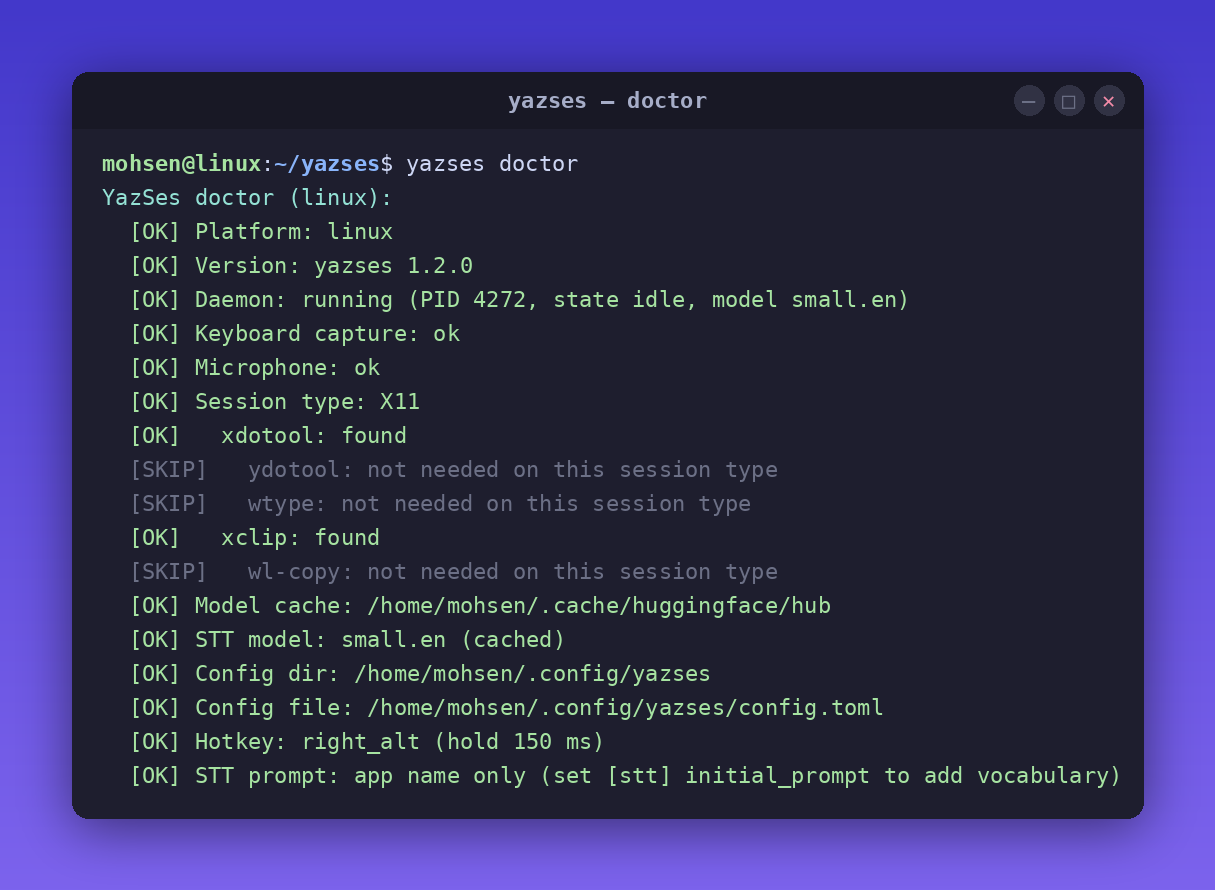
yazses doctor     # check mic, injection backend, permissions (want [OK] Keyboard capture)
yazses enroll     # calibrate your microphone (~30 s)
yazses start      # start the dictation daemon
Hold the hotkey (Space on Linux, Right Option on macOS, Right Ctrl on Windows), speak, release — the text appears in the focused app within about a second.
What it does
- Offline dictation — type into any focused app with on-device faster-whisper (CPU, int8). No GPU needed.
- Transcribe recordings —
yazses transcribe meeting.m4aturns any audio/video file into text, fully offline. Add--diarizeto tag who said what and--format srtfor subtitles. See the transcription guide. - Voice commands — a regex grammar (plus an optional ~0.5B SLM router) maps phrases to editor/terminal key sequences: "undo that", "save file", "go to line 42", "run the tests", "rename this to user_id".
- Macros & personal vocabulary — define multi-step commands and teach YazSes your mis-heard words.
- Dysfluency-Friendly Mode — opt-in collapse of stutters/repeats for stuttered or dysarthric speech.
- Self-improving — opt-in, encrypted on-device learning corpus;
yazses tuneproposes accuracy fixes from your own corrections. - Accessibility — VAD calibration, mic-level tuning, and EMG (muscle-sensor) trigger support.
When not to use it
YazSes is not an LLM agent — it dictates text and runs editor/terminal commands; it does not browse, reason over your files, or hold a conversation. It uses CPU faster-whisper (a cloud service may still win on raw accuracy for a noisy mic), ships English-tuned *.en models by default, and is desktop-only.
How it works
Hold hotkey → record audio → VAD gate → faster-whisper (CPU)
            → clean + disfluency filter → command grammar (Tier 1 regex,
              optional Tier 2 SLM router) → dictate? type it · command? send keys
Two at-a-glance signals show you what YazSes is doing: a top-bar "Y" tray icon whose colour is a live state indicator (🔵 idle · 🟢 dictating · 🟡 no text target → clipboard · 🟣 command mode · 🔴 problem) and an optional sonar overlay that pulses near your cursor while it's listening. See Tray icon & overlay for what each colour means.
Documentation
- Install on Linux · macOS · Windows
- CLI reference — every command and flag
- Configuration — every
config.tomlsection - Features & v2 preview
- Architecture & diagrams
- Troubleshooting & roadmap
FAQ
Does it work without internet? Yes — transcription runs locally; nothing is sent anywhere by default.
What GPU do I need? None. It runs on CPU; 4 GB RAM minimum, 8 GB comfortable.
Does it work on Wayland? Yes via the APT or pipx install (uses wtype/ydotool). Use one of those, not the snap — strict confinement stops the snap from reading the keyboard, so the hold-to-talk hotkey never fires.
Is it a replacement for Talon? YazSes focuses on offline dictation plus a practical command grammar. Talon has far more advanced scripting. They can coexist.
Apache-2.0 licensed. If YazSes is useful to you, a ⭐ on GitHub helps others find it.